
Status: AVAILABLE
Click Tool on the left. The Tool & Values page shows the default tool for new operations (type, diameter, cutting length, suitability) and the default cutting values (depth from stock top, stepdown, feed, plunge, spindle speed, safety clearance). Open the library with Tool library ….
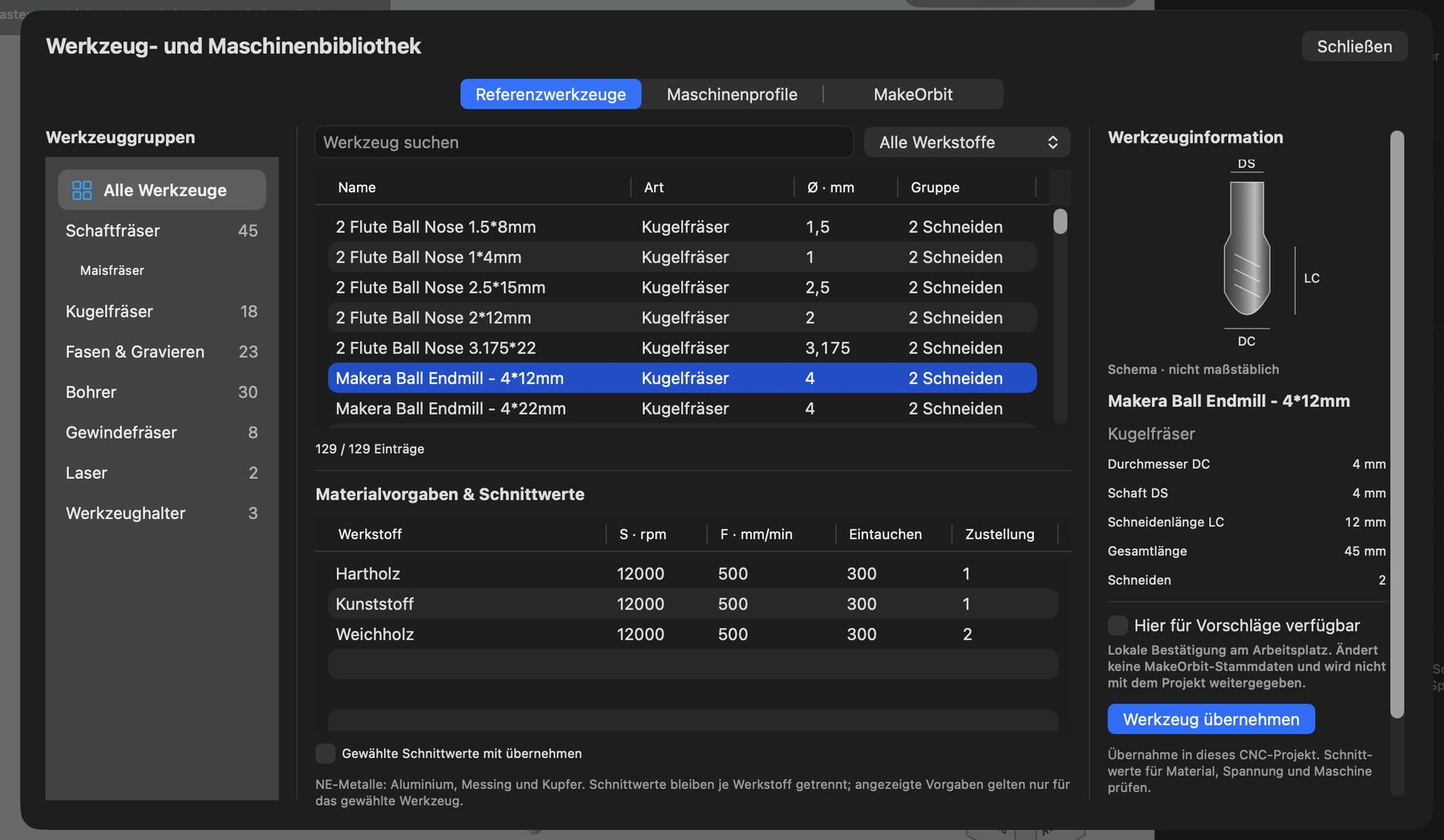
Tool library
The Tool and machine library has three tabs: Reference tools, Machine profiles and MakeOrbit.
The reference tools area (currently 129 entries) is organized as follows:
- Tool groups on the left: end mills (including the corn-cutter subgroup), ball-nose cutters, chamfering & engraving, drills, thread mills, lasers, tool holders.
- Tool table in the center, with a search field and material filter (“All materials”).
- Below it, Material presets & cutting values: spindle speed (S), feed (F), plunge feed and stepdown for each material.
- On the right, Tool information with a schematic drawing (diameter DC, shank DS, cutting length LC, overall length, flute count).
- Available here for suggestions – confirms that you own this cutter (see below).
- Use tool – inserts the tool into your project; “Also use selected cutting values” includes the values for the selected material.
Each material has its own cutting values. Non-ferrous metals (aluminium, brass, copper) are grouped for searching, but cutting values always apply only to the specific individual material. A cutter approved only for aluminium is never automatically suggested for brass.
Confirm available cutters
Use Available here for suggestions (in the library) or Select available cutters … to tick the cutters you actually own. This confirmation applies only on your computer and is not passed on with the project. Automatic suggestions use only this selection – the full catalog is used only when explicitly requested.
Tool holding and tool numbers
For each cutter, enter its stick-out length (how far it extends from the collet) and the holder height. Each operation has a tool number (T1, T2 …). Conflicts – two different cutters with the same number – are detected and can be resolved, on request, with a suggestion that requires confirmation.
Tool-change planning
Status: EXPERIMENTAL – magazine assignments and virtual automatic changes are planned; the user always confirms real changes.
Warnings
The program warns when a tool and material are unsuitable for one another, when spindle speed or feed falls outside the machine limits, or when no cutting values are available for the selected material. It does not invent values or silently clamp catalog values to limits.