Before you start, here are a few terms you will encounter repeatedly in this guide.
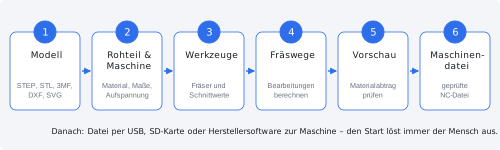
What does a CNC mill do?
A CNC mill uses computer control to move a rapidly rotating tool — the milling cutter — through a piece of material called the stock. Material is removed layer by layer until the intended part remains. “CNC” stands for Computerized Numerical Control.
The X, Y and Z axes
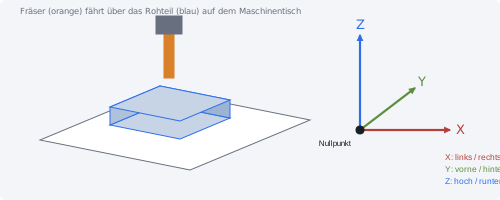
- X — left/right
- Y — front/back
- Z — up/down
- A — rotary axis around X (only machines with a 4th axis, e.g. Makera Z1 Pro with rotary module)
The zero point (also “workpiece zero”) is the point from which all movements are measured. It is usually a corner or the centre of the stock’s top face.
Tools
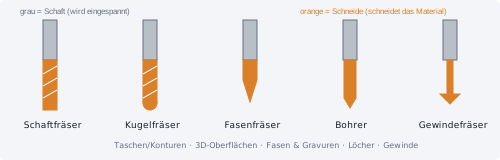
- Flat end mill: The all-rounder for pockets, contours and flat faces.
- Ball-nose cutter: Rounded at the tip, for smooth 3D surfaces.
- Chamfer and engraving cutters: Tapered to a point, for bevelled edges and engravings.
- Drill: For round holes.
- Thread mill: For internal and external threads.
- Corn-cob cutter: Coarse serrations for rapid material removal (a subgroup of end mills).
Every cutter has a shank (the part held in the holder) and a cutting edge (the part that cuts). The shank is clamped in a collet, whose diameter must match the shank (e.g. 3.175 mm, 4 mm or 6 mm).
Cutting parameters
- Spindle speed (rpm): how quickly the cutter rotates.
- Feed (mm/min): how quickly the cutter moves through the material.
- Stepdown (mm): how deeply the cutter enters the material per pass.
- Stepover (mm or %): the distance between two neighbouring milling paths.
MakeOrbit CNC Studio takes these values from a checked tool catalog. You do not need to know them in Guided Mode.
Roughing and finishing
- Roughing: Removing a large amount of material quickly. The surface stays rough and a small allowance (remaining material, e.g. 0.2 mm) is left.
- Finishing: Producing the final surface slowly and precisely.
Fixtures and setups
The stock must be held firmly on the machine. Fixtures (clamps, jaws, a vise) are used for this. The way the stock is positioned and secured on the machine is called a setup. If a part is machined from several sides, each side needs its own setup.
Tabs and spoilboard
If a part is cut completely out of a sheet, it would come loose at the end and could be thrown around. Small tabs are therefore left in place; you subsequently separate them with a saw or file. A spoilboard underneath the stock protects the machine table during through-cutting.
NC file and postprocessor
The NC file (also G-code) is the list of commands the machine executes. Each machine controller understands a slightly different dialect. The postprocessor (“post”) translates the calculated milling paths into the exact dialect of your machine.